
Your first runs in Coreshatter
Your Core fires on its own. You choose its weapons, shape the build through Drafts, and decide when to end the run. The Scrap and Data you bank pay for the next one.
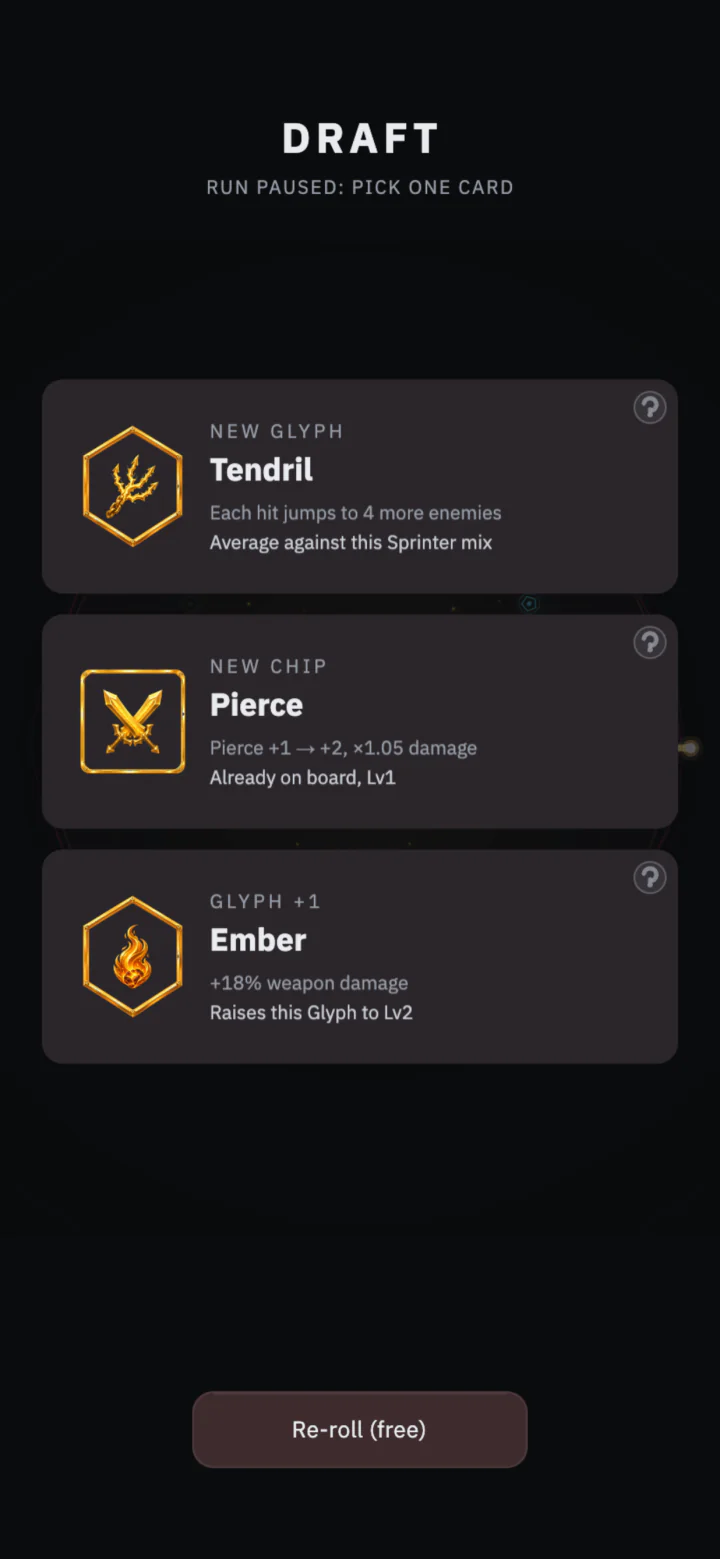
Read the Draft
A Draft pauses the run and asks you to pick one card. A new Glyph adds a weapon. A Glyph level raises a weapon already on your board. Chips add bonuses such as damage, fire rate, slow, or a lower Heat rate.
Read the card’s “this pick” text before choosing. It tells you whether you are adding a firing pattern, raising a level, or completing a set or Circuit.
A normal Draft starts with one free re-roll. After that, check the button before using it again. A further re-roll can add Heat. Your first run begins with a simpler Draft, and some later upgrades change the number of cards or re-rolls.
Glyphs, Chips and Circuits
Glyphs are the Core’s weapons. Ember fires bolts, Tendril chains hits between enemies, and Halo places orbiting nodes around the Core. Every equipped Glyph fires, so an extra slot gives you room for another weapon. You begin with two slots and can buy more in the Foundry.
Chips occupy the grid on your board. Their bonuses affect the build, and their tags can form Circuits. A Circuit needs its required tags in one group connected horizontally or vertically. Diagonal contact alone does not connect a group. Check the board’s Circuit readout after moving Chips.
Glyph sets use weapon identities instead of Chip positions. Three Glyph identities from the same set activate its bonus. The four sets affect burn spread, chains, zone size, or the number of bodies a weapon creates. A Fusion keeps both parent identities for set counting. The Glyph fusion guide covers compatible pairs and how the Draft offers them.
Heat and the Front
Heat rises with time and kills. At 100% Heat, the run ends. Heat-reducing Chips and Circuits slow its rise, while Heat ceiling in the Foundry raises the cap. Once Heat enters the red band, the Front closes faster.
The Front is the corruption closing on your Core. It moves inward on its own. Corruptors, Battering Lanes, and bosses speed it up while alive, and enemies push it inward when they reach the Core. If the marker reaches the red notch on the FRONT bar, the Core breaches.
Watch Core integrity too. Each enemy that reaches the Core removes integrity. A boss reaching it causes an immediate breach.
- REPAIR
- Spends run Scrap to restore Core integrity.
- HOLD
- Spends run Scrap to push the Front back. Against a boss’s timed attack, a well-timed HOLD can also cool Heat.
These actions spend the Scrap you are earning during the run. Check their cost alongside the bank amount when deciding whether to keep going.
When a run ends
SHATTER ends the current run and banks its Scrap and Data. In a standard run, choosing to Shatter also banks the available Shatter bonus. The bonus grows as you clear later waves and spend time at high Heat.
A breach or Heat peak still banks the run’s Scrap and Data, but loses the Shatter bonus. You can see the amount protected and the current bonus in the run HUD. If the Core is about to breach or Heat is nearly full, those amounts show what you will bank by ending the run now.
Later, Gambits let you stake Axioms on a target wave. A Gambit has its own payout rules and no Shatter bonus. Clear its target and Shatter by hand to win the stake.
Spend between runs
Spend banked Scrap in the Foundry on damage, fire rate, Core integrity, Heat ceiling, and board space. Pick an upgrade that addresses the last run’s ending. More integrity lets the Core take more hits. A higher Heat cap postpones Heat peak. Another Glyph slot makes room for another weapon.
Data pays for Mainframe upgrades. Buy Data Mining to earn Data while away, and use the Mainframe’s capacity and Auto-Run upgrades to extend or improve away earnings. Auto-Pick controls card choices during a played run. Auto-Run earns Scrap while the app is closed.
The Codex records Glyphs and Fusions. Using them in banked runs earns mastery XP. You can also spend Data on Glyph mastery. Mastery adds bonuses while the relevant Glyph is on the board and opens stronger Fusion pairs.
What Convergence resets
Convergence opens after you bank enough Scrap since the previous Convergence. The progress display shows how much more you need. It awards Shards to spend in the Lattice and advances the unlocks tied to your Convergence count.
Convergence resets Scrap, Data, Foundry upgrades, and most Mainframe levels. If you bought Data Mining or Auto-Assist, each keeps its first level. Your Core Map, Lattice, Shards, Codex, Flux, Research, and statistics stay.
Check the Convergence preview before confirming. It lists the award, what resets, and what you keep. Shatter ends one run. Convergence resets those upgrades and currencies across your account.
Your first Convergence also opens Strain. Each Strain level adds a run rule and pays a reward for its first clear. Core Laws add optional rules with an upside and a cost. Read the selected rule before starting a run.
Away rewards and interrupted runs
Bank one run to begin earning Scrap while away. Each Core starts with a five-hour Auto-Run queue. Upgrades can extend it. Scrap banks when you return, using an away rate based on that Core’s current power and automation.
Data Mining opens away Data earnings. The Data window starts at 48 hours. Offline Capacity raises it by three hours per level, up to 72 hours. The Scrap queue and Data window are separate limits. The game’s away-rewards screen shows the limits and rate for your account.
An interrupted standard run can resume from its saved state without a 30-minute age limit, provided the save can be restored. Ranked runs expire after 30 minutes away.